Posts

Display Current Login User Name in Sharepoint 2010 Using Sharepoint Designer 2010
Image
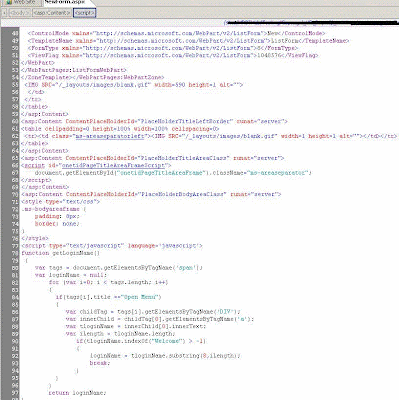
Display the current login username in sharepoint control.We have only access to sharepoint designer. We dont have access to add serverside code.  So we decide to user "Welcome username" message. We used javascript to display the username. Please check the following code. setPickerInputElement(1); call this function, and pass the people & group No.if there is only one people & control use "1", if you have more than 1, give on which control the current username need to display. Screen1:Paste the code as shown. Screen 2: With this approach, instead of people or group control, you can display the user name in textbox if required.

Sharepoint Programming

Q) Retrieving information from linked lists in SharePoint using LINQ to SharePoint? using System.Linq; using Microsoft.SharePoint; using Microsoft.SharePoint.Linq; In the Page_Load method, add the following code: DataContext dc = new DataContext(SPContext.Current.Web.Url); var customers = dc.GetList < Customer > (“Customers”); var customerDataSource = from customer in customers select new {CustomerName = customer.Title, ContactLastName = customer.PrimaryContact.Title, ContactFirstName = customer.PrimaryContact. FirstName}; CustomerGridView.DataSource = customerDataSource; CustomerGridView.DataBind() Q)How you can retrieve the name of each folder in the top - level site of a site collection, as well as the number of subfolders that each folder contains? using System; using System.Text; using Microsoft.SharePoint; namespace Wrox.SixInOne { class Program { static void Main(string[] args) { StringBuilder folderName = new StringBuilder(); using (SPSite si...

Add barcode to your document new feature in SharePoint 2010

Image
Barcode option coming as a content type  information policy that you can enable it for any content type inherited from Document content type or inherited from any content type that inherit Document content type. 1-      From site settings page click on site content types 2-      Click on your content type that you need to enable barcode on it 3-      Click on “information management policy settings 4-      In the next page check the following options: Enable Barcodes. Prompt users to insert a barcode before saving or printing:  this option will enforce the user to add a barcode in the document header before saving this document. Then click ok. 5-      After enabling the feature, you have to modify the view of the library. Go to the library you want to display the barcode in, and select library from the ribbon on the top. 6-...

SQL Server Reporting Service Configuration

Image
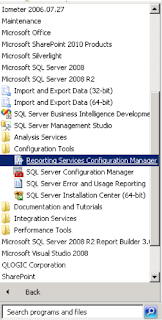
SSRS Configuration SQL server reporting services can be configured in two modes §   Native mode §   SharePoint Integration mode When reporting services are running in native mode, the reports will store on SQL server reporting server. When user sends a request for report the response comes from Report Server in SQL Server. When reporting services running in SharePoint integration mode, SharePoint gets the reports from server via web service to end users. Installation Instructions SQL Server 2008 R2 Installation instructions to enable reporting services in SharePoint integration mode. 1. Select the SQL Server Feature Installation option from SQL Server 2008 R2 setup page 2. On the features selection page, Select Database Engine Services , Reporting Services then click Next 3. In Server Configuration page enter appropriate credentials and click Next Note: SharePoint 2010 products in farm configuration require domain accounts     for...

Ajax Control Toolkit working with SharePoint 2010

Image
How to make Ajax Control Toolkit working with SharePoint 2010? Here are the steps to make Ajax Control Toolkit working with SharePoint 2010. Download Correct (compatible) version of Ajax Control Toolkit. Since current release of Ajax Control Toolkit doesn’t work with SharePoint 2010, you need to download previous release. Maybe Ajax Control Toolkit team will address this issue and we’ll be able to use current Toolkit version with SharePoint in future. Until the current release is made compatible, please download the  SharePoint 2010 compatible Ajax Control Toolkit from here . Add AjaxControlToolkit.dll reference to your project To use the Ajax Control Toolkit in your SharePoint project, add reference to the AjaxControlToolkit.dll in your project. To use the Ajax Control Toolkit in any web part control add the following lines to register the Ajax Control Toolkit namespace. <% @ Register Assembly ="AjaxControlToolkit, Version=3.0.30930.28736, Culture=neutral, Public...

WCF

Overview Building a distributed system is a very common task for many programmers. However, doing so involves confronting numerous design challenges. In this chapter, you will review two key aspects of many distributed systems (interfaces and XML web services), followed by an overview of Service-Oriented Architectures (SOAs). Also, you will survey several core distributed APIs found within the Windows OS. With this historical background in place, the remainder of this chapter will introduce you to the Windows Communication Foundation (WCF) API. Here you will learn about the problems WCF attempts to solve, study the ABC’s (addresses, bindings, and contracts) of building a WCF application, and explore some common WCF development tools. The information presented here will function as the backbone for the remainder of the class. A Working Definition of Windows Communication Foundation (WCF) To begin your examination of WCF, you will start with a r...

Microsoft launches IUseSharePoint.com

Microsoft has launched a new website named  IUseSharePoint.com . The site contains a lot of tips&trick on how to use SharePoint and has a lot of videos and testimonials from customers on how they are using SharePoint. http://sharepoint.microsoft.com/iusesharepoint/landing.aspx